While experimenting with a Spark job to read the same dataset in both CSV and Parquet formats, I observed that queries on Parquet were significantly faster. I was aware that Parquet, being a columnar storage format, is designed to be performant, but I wanted to better understand why it consistently outperforms CSV - especially in OLAP workloads.
Let’s explore the reasons behind Parquet’s performance advantage, and examine the features that make it particularly efficient for analytical queries.
The following PySpark code snippet demonstrates generating a synthetic dataset of 500,000 records using the Faker library. The dataset is then persisted in both CSV and Parquet formats for comparison.
from pyspark.sql import SparkSession
from pyspark.sql.types import StructType, StructField, IntegerType, StringType, BooleanType
from faker import Faker
import time

spark = SparkSession.builder \
    .appName("CSV vs Parquet Performance") \
    .config("spark.driver.bindAddress", "127.0.0.1") \
    .getOrCreate()

fake = Faker()

# ---------------------------
# Generate synthetic dataset
# ---------------------------
num_records = 500_000

data = []
for i in range(num_records):
    data.append((
        i,                                      # id
        fake.name(),                            # name
        fake.email(),                           # email
        fake.city(),                            # city
        fake.random_int(min=18, max=80),        # age
        fake.boolean()                          # is_active
    ))

columns = ["id", "name", "email", "city", "age", "is_active"]

df = spark.createDataFrame(data, columns)

csv_path = "faker_csv_dataset"
parquet_path = "faker_parquet_dataset"

df.write.mode("overwrite").csv(csv_path, header=True)
df.write.mode("overwrite").parquet(parquet_path)

# Define schema explicitly
custom_schema = StructType([
    StructField("id", IntegerType(), True),
    StructField("name", StringType(), True),
    StructField("email", StringType(), True),
    StructField("city", StringType(), True),
    StructField("age", IntegerType(), True),
    StructField("is_active", BooleanType(), True)
])

def measure_time(description, file_format, path, read_func):
    start = time.time()
    if file_format == "csv":
        df = spark.read.format(file_format).schema(custom_schema).option("header", True).load(path)
    else:
        df = spark.read.format(file_format).load(path)
    result = read_func(df)
    elapsed = time.time() - start
    print(f"{description} | {file_format.upper()} Time: {elapsed:.2f} sec")
    return elapsed

def read_all_columns(df): return df.count()
def read_selected_columns(df): return df.select("id", "name").count()
def read_with_filter(df): return df.filter("age > 40 AND is_active = true").count()
def read_count_only(df): return df.count()

scenarios = [
    ("Full Scan", read_all_columns),
    ("Column Projection", read_selected_columns),
    ("Filtered Read", read_with_filter),
    ("Count Only", read_count_only)
]

results = []
for desc, func in scenarios:
    csv_time = measure_time(desc, "csv", csv_path, func)
    parquet_time = measure_time(desc, "parquet", parquet_path, func)
    results.append((desc, csv_time, parquet_time, csv_time/parquet_time))

print("\n=== Performance Summary ===")
print(f"{'Scenario':<20}{'CSV (sec)':<15}{'Parquet (sec)':<15}{'Speedup'}")
for desc, csv_t, parq_t, speedup in results:
    print(f"{desc:<20}{csv_t:<15.2f}{parq_t:<15.2f}{speedup:.2f}x")
The time taken to read both the CSV and Parquet files under different scenarios is summarized below.
=== Performance Summary ===
Scenario            CSV (sec)      Parquet (sec)  Speedup
Full Scan           1.69           0.35           4.90x
Column Projection   0.30           0.11           2.58x
Filtered Read       0.38           0.19           2.02x
Count Only          0.10           0.09           1.07x
Although both files contain the same dataset, the CSV file size is approximately 31 MB, whereas the Parquet file size is only 15 MB - roughly a 50% reduction. This size difference stems from Parquet’s columnar storage layout, dictionary encoding, and compression. As dataset volume scales, this difference becomes more pronounced, with Parquet offering significant storage efficiency and I/O performance improvements compared to CSV.
What is Parquet?
Storage layout models

As illustrated in the above diagram, row-oriented storage organizes data using horizontal partitioning, where all values of a row are stored contiguously. In contrast, column-oriented storage applies vertical partitioning, storing all values of a column contiguously. Additionally, modern formats such as Parquet adopt a hybrid approach, combining the advantages of both - organizing data in row groups (horizontal segmentation) while storing each column within those groups in a columnar layout for optimized compression and query performance.

Row-oriented storage is typically better suited for OLTP (Online Transaction Processing) workloads, where the system handles numerous small, transactional operations across different rows. In such systems, insert operations can simply append new rows to the end of the dataset, while update operations can directly locate the target row and modify the corresponding column values in place. This design optimizes for fast row-level writes and updates common in transactional systems.

Column-oriented storage is generally better suited for OLAP (Online Analytical Processing) workloads, which involve large-scale operations on a subset of columns. Unlike row stores, columnar formats are not ideal for OLTP scenarios, because inserting a new row requires updating multiple column segments stored in different locations - resulting in a fragmented memory access pattern and higher write overhead.
In OLAP workloads, however, this columnar design provides significant advantages:
Projection pushdown allows the query engine to read only the relevant columns instead of scanning the entire dataset.
Compression efficiency is improved because similar data values are stored adjacently within each column.
Fragmented Memory access

As illustrated in the diagram above, when a query requires only columns A and C, a row-oriented format still necessitates reading entire rows, leading to a fragmented memory access pattern and introducing potential overhead. In contrast, a columnar format stores each column’s values contiguously, enabling the query engine to retrieve the required columns in a linear, sequential access pattern. This results in more efficient I/O utilization and faster query performance for column-specific analytical workloads.
That said, a pure columnar model is not always optimal for row reconstruction. Since values for each column are stored separately, reconstructing full rows often requires scanning multiple column segments and merging them during query execution. This can introduce additional CPU and memory overhead, particularly in workloads that frequently require complete row materialization.
This is where the hybrid storage model comes into play, combining the advantages of both row-oriented and column-oriented approaches.

Parquet dataset on disk is not represented as a single physical file. Instead, it is typically organized as a directory structure, where the logical dataset is defined by the root directory. This root directory contains multiple Parquet part files.
dataset_root/
  ├── part-00000-uuid.parquet
  ├── part-00001-uuid.parquet
  └── part-00002-uuid.parquet
Parquet data organization
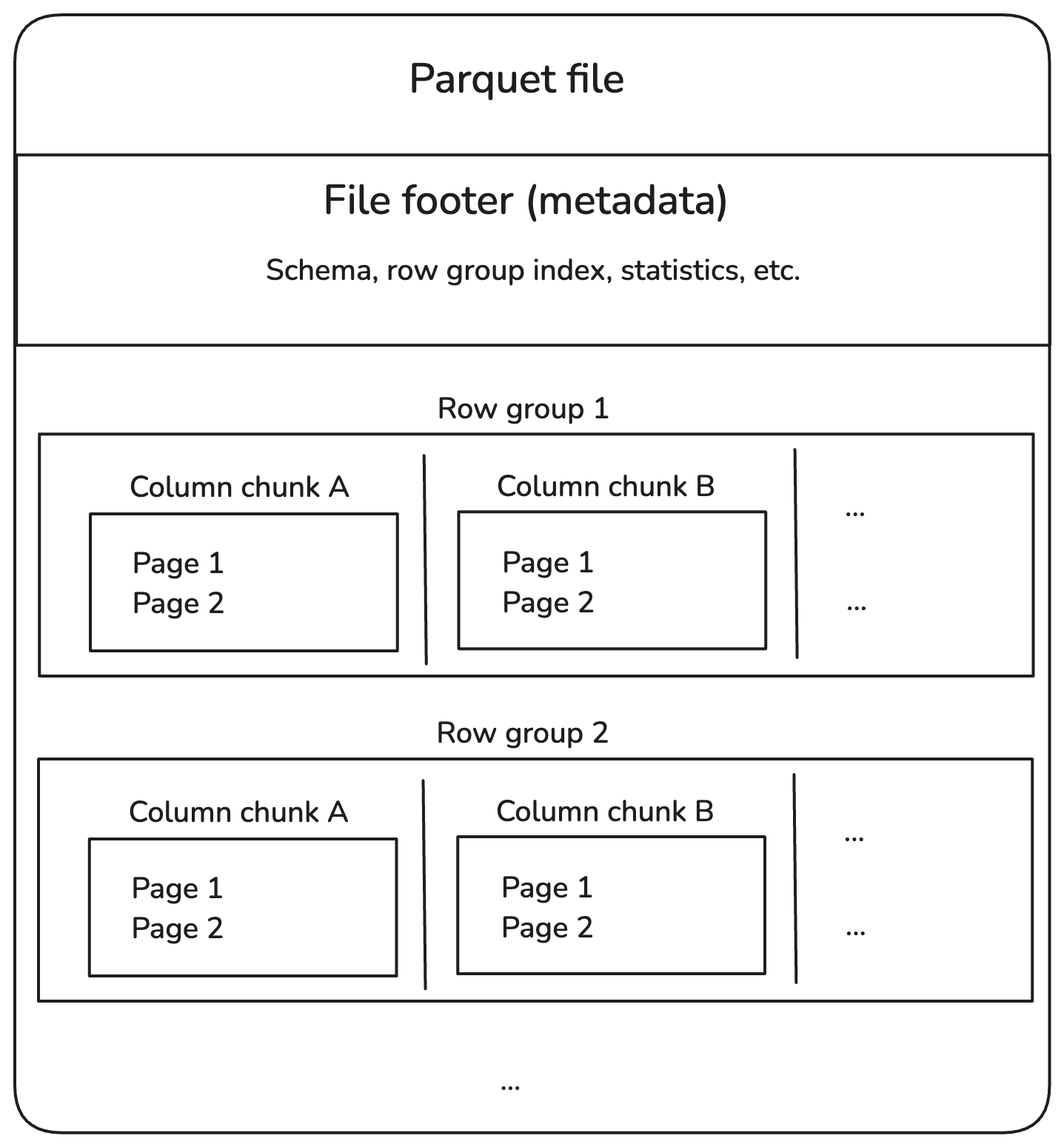
Directory → Part Files → Row Groups → Column Chunks → Pages
A single Parquet file can contain multiple Row Groups, each holding a horizontal slice of the dataset. The number and size of Row Groups within a file are determined by the configured Row Group size and the amount of data written.
Row Groups
Horizontal partition of data inside a file.
Each Row Group contains all columns for a subset of rows.
Default size ≈ 128 MB (configurable).
Optimized for parallel reads: Each Row Group can be read independently.
Column Chunks
Vertical partition of data inside a Row Group.
Each Column Chunk contains the values of a single column for all rows in that Row Group.
Statistics for each column chunk:
Minimum value
Maximum value
Null count
Enables:
Projection pushdown (read only required columns and with the above statistics we can skip the row groups that doesn’t match the filter conditions)
Better compression (similar values are adjacent)
Pages

The output above demonstrates that the inspected column chunk contains three pages, utilizing dictionary encoding wherever applicable.
Smallest unit of storage in a Column Chunk.
Types of pages:
Data Pages: Contain actual column values (can use encodings like Dictionary, RLE, Delta).
Dictionary Pages: Contain unique values for dictionary encoding.
Index Pages: Optional, for faster lookups.
Default page size ≈ 1 MB.

Upon inspecting one of the Parquet part files using the parquet-cli tool, we observe that the file contains a single Row Group with approximately 49,000 records. The Row Group metadata also includes column-level statistics, such as the minimum and maximum values for each column.
For example, if the Age column in this file has a recorded maximum value of 70, and a query requests only records where Age > 70, the query engine can determine—based on these statistics—that no matching rows exist in this file. As a result, the engine can skip reading this file entirely, avoiding unnecessary I/O. This optimization, known as predicate pushdown, is one of the key reasons why Parquet performs so well for analytical workloads.
Encoding Schemes
Dictionary Encoding

In the example above, the Column Chunk for
cityincludes a Dictionary Page that stores the unique city names present in the Row Group. All subsequent Data Pages within this column reference these values through dictionary indexes, rather than storing the full strings repeatedly. This approach significantly reduces storage size and improves read performance.How it works:
Stores a dictionary of unique values once
Replaces actual values with integer indexes into the dictionary
When used: Columns with low cardinality (few distinct values)
Pros: Significant space saving
Example:
  Original Values: [London, Paris, London, New York, Paris]
  Dictionary: {0: London, 1: Paris, 2: New York}
  Encoded Indexes: [0, 1, 0, 2, 1]
Run-Length Encoding (RLE)
How it works: Compresses consecutive repeated values as a single value + count
When used: Columns with runs of repeated values
Pros: Excellent for sorted / repeated data
Example:
  Original Values: [A, A, A, A, B, B]
  Encoded: (A,4), (B,2)
Delta Encoding (Delta Binary Packed)
How it works:
Stores the difference (delta) between consecutive values
Often combined with bit packing for integers
When used: Numeric columns where values are sorted or increment gradually
Bit Packing / Boolean Packing
How it works: Stores multiple boolean values or small integers in a single byte or word by packing bits tightly.
When used: Boolean or low-cardinality integer fields
Example:
  Boolean Values: [T, F, T, T, F, F, T, F]
  Encoded as: 10110010 (binary)
Plain Encoding
How it works: Stores values in their raw form (uncompressed binary representation).
When used:
- As a fallback when no encoding benefits are possible
Pros: Fast decode speed
Cons: Larger size if values are repetitive
Example:
  Values: [25, 30, 35, 40]
  Encoded: 25 30 35 40 (no transformation)
Parquet’s hybrid columnar format makes it compact, efficient, and fast for analytical workloads. With features like projection pushdown, predicate pushdown, and advanced encodings, it minimizes storage and speeds up queries.
Thus, Parquet has become the default storage format for modern open table formats such as Apache Iceberg, Delta Lake, and Apache Hudi, thanks to its efficiency, scalability, and compatibility with analytical workloads.
I hope this article added value to your understanding of Parquet internals. Thanks for reading! 🚀